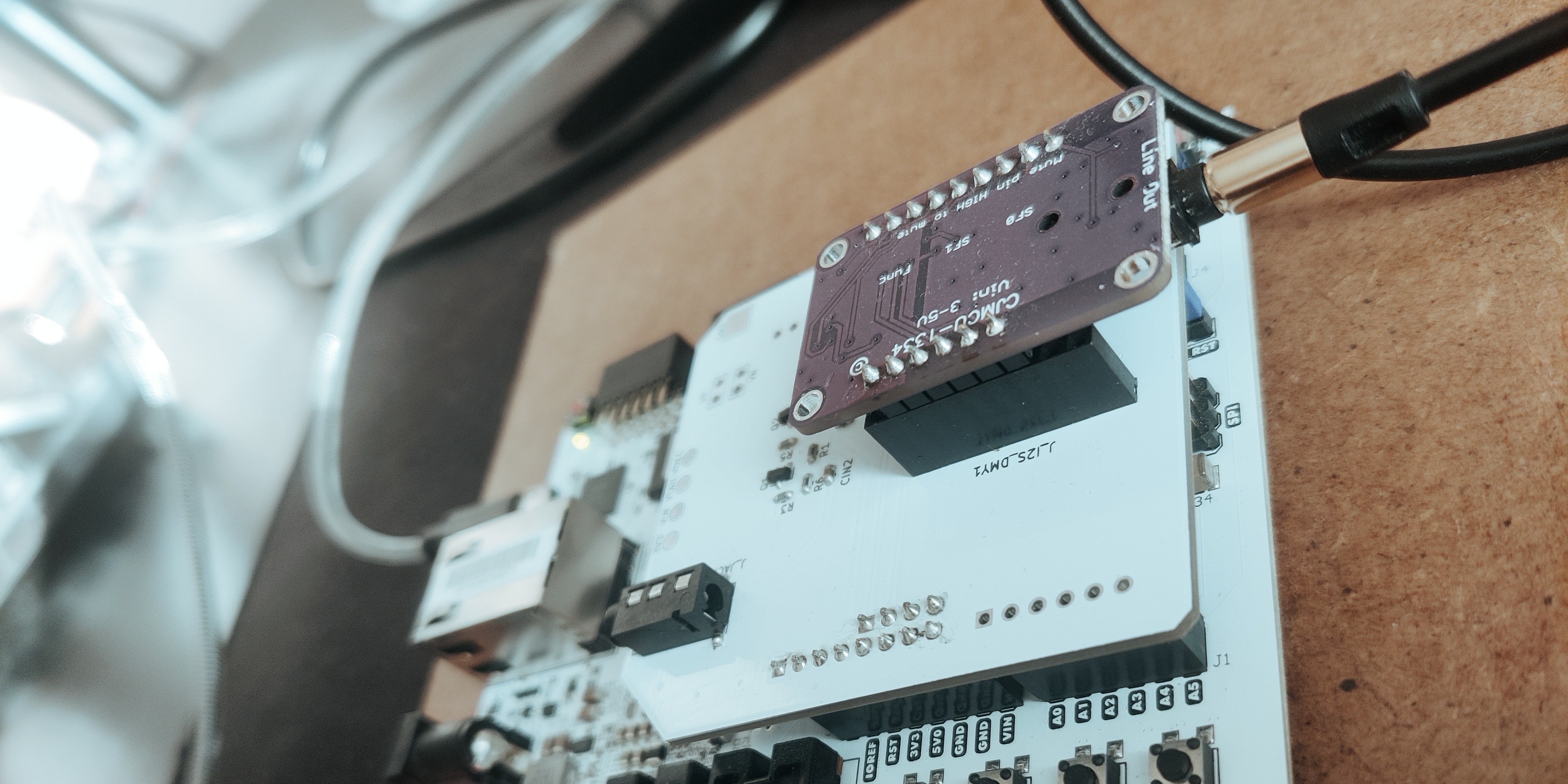
Introduction#
While keeping sight of my target when doing this project, there were some components on the Arty that I don’t really know how to use. One of these was the DRAM mounted on the board. Hence, I wanted to implement the most obvious effect that needs some kind of memory of previous samples.
Basically, at some point in the chain, the delay will take samples at a rate of 48KHz, store them in a circular buffer in RAM, and set up a read pointer at some distance from the write pointer, such that reading yields back audio from the past. The math for this is quite simple in the end: with a sampling rate of 48KHz, every memory address of distance between read and write adds ~20.8 microseconds of delay. So let’s say I want a delay of up to ~2 seconds — we’ll need 192000 bytes of memory. It’s honestly not even that much when the mounted memory is 1GByte.
So, on the specification side, I need a circular buffer that can store the 16-bit samples at 48KBaud and read back with a variable distance. I will treat this module as a FIFO for all purposes from now on.
Talking with the memory controller#
Setting up the controller from Vivado was honestly a painful experience. I had to figure out many things along the way, so let me put together a recipe here that will be useful for the next time I have to implement a memory controller.
DDR Configuration#
Almost all of the configuration can be intuitive, but Vivado might not recognize or remember that you set up a Digilent board. I had to figure out the pin association from the schematic and place it by hand. If for some reason I had to reconfigure, those settings were lost, so I spent a lot of time re-entering many rows of pins in the configuration form. So, here is the configuration for the Arty A7:
 1
 2
 3
 4
 5
 6
 7
 8
 9
10
11
12
13
14
15
16
17
18
19
20
21
22
23
24
25
26
27
28
29
30
31
32
33
34
35
36
37
38
39
40
41
42
43
44
45
46
47
48
| NET "ddr3_addr[0]" LOC = "R2" | ;
NET "ddr3_addr[10]" LOC = "R6" | ;
NET "ddr3_addr[11]" LOC = "U6" | ;
NET "ddr3_addr[12]" LOC = "T6" | ;
NET "ddr3_addr[13]" LOC = "T8" | ;
NET "ddr3_addr[1]" LOC = "M6" | ;
NET "ddr3_addr[2]" LOC = "N4" | ;
NET "ddr3_addr[3]" LOC = "T1" | ;
NET "ddr3_addr[4]" LOC = "N6" | ;
NET "ddr3_addr[5]" LOC = "R7" | ;
NET "ddr3_addr[6]" LOC = "V6" | ;
NET "ddr3_addr[7]" LOC = "U7" | ;
NET "ddr3_addr[8]" LOC = "R8" | ;
NET "ddr3_addr[9]" LOC = "V7" | ;
NET "ddr3_ba[0]" LOC = "R1" | ;
NET "ddr3_ba[1]" LOC = "P4" | ;
NET "ddr3_ba[2]" LOC = "P2" | ;
NET "ddr3_cas_n" LOC = "M4" | ;
NET "ddr3_ck_n[0]" LOC = "V9" | ;
NET "ddr3_ck_p[0]" LOC = "U9" | ;
NET "ddr3_cke[0]" LOC = "N5" | ;
NET "ddr3_cs_n[0]" LOC = "U8" | ;
NET "ddr3_dm[0]" LOC = "L1" | ;
NET "ddr3_dm[1]" LOC = "U1" | ;
NET "ddr3_dq[0]" LOC = "K5" | ;
NET "ddr3_dq[10]" LOC = "U4" | ;
NET "ddr3_dq[11]" LOC = "V5" | ;
NET "ddr3_dq[12]" LOC = "V1" | ;
NET "ddr3_dq[13]" LOC = "T3" | ;
NET "ddr3_dq[14]" LOC = "U3" | ;
NET "ddr3_dq[15]" LOC = "R3" | ;
NET "ddr3_dq[1]" LOC = "L3" | ;
NET "ddr3_dq[2]" LOC = "K3" | ;
NET "ddr3_dq[3]" LOC = "L6" | ;
NET "ddr3_dq[4]" LOC = "M3" | ;
NET "ddr3_dq[5]" LOC = "M1" | ;
NET "ddr3_dq[6]" LOC = "L4" | ;
NET "ddr3_dq[7]" LOC = "M2" | ;
NET "ddr3_dq[8]" LOC = "V4" | ;
NET "ddr3_dq[9]" LOC = "T5" | ;
NET "ddr3_dqs_n[0]" LOC = "N1" | ;
NET "ddr3_dqs_n[1]" LOC = "V2" | ;
NET "ddr3_dqs_p[0]" LOC = "N2" | ;
NET "ddr3_dqs_p[1]" LOC = "U2" | ;
NET "ddr3_odt[0]" LOC = "R5" | ;
NET "ddr3_ras_n" LOC = "P3" | ;
NET "ddr3_reset_n" LOC = "K6" | ;
NET "ddr3_we_n" LOC = "P5" | ;
|
Other settings are basically dictated by what you want to do. I didn’t want AXI, so I disabled that interface. Another tricky part was that the exact component on my board wasn’t the one set by default. I set MT41K128M16XX-15E for my memory, with a data width of 16, 4 banks, and normal ordering.
While I don’t need crazy speed, I’ll stick with correctness when possible — hence I set the impedance controls to RZQ/6 and used a BANK-ROW-COLUMN memory address mapping.
In my application I have two clocks: a system clock at 100MHz and a DSP clock at 60MHz. I use the system clock for the controller, so in the configuration I set it to “No Buffer” with reset active low, and disable the XADC because I want exclusive control from the analog front end.
Other settings aren’t complicated to understand, so I’ll skip them. After this you get a memory controller with a native interface that’s not too hard to use.
Communication protocol#
Here things got a bit messy on my side. I ended up making a controller that’s integrated with the delay function, instead of implementing the controller separately and having a delay module use it. Hence, what comes next is not necessarily standard.
The memory interface generator (MIG from now on) exposes a few controls:
 1
 2
 3
 4
 5
 6
 7
 8
 9
10
11
12
13
14
15
| // MIG interface
output logic [27:0] app_addr,
output logic [2:0] app_cmd,
output logic app_en,
input logic app_rdy,
output logic [127:0] app_wdf_data,
output logic app_wdf_wren,
input logic app_wdf_rdy,
input logic [127:0] app_rd_data,
input logic app_rd_data_valid,
input logic app_rd_data_end,
input logic calib_done,
output logic status
|
The rules are simple, and the best way to implement the control is with an FSM.
 1
 2
 3
 4
 5
 6
 7
 8
 9
10
| case (ram_state)
3'b000 : ram_state <= host_wr_ff2 ? 3'b001 : 3'b000; // IDLE
3'b001 : ram_state <= (app_wdf_rdy & app_rdy) ? 3'b010 : 3'b001; // WRITE
3'b010 : ram_state <= 3'b011; // COMMIT
3'b011 : ram_state <= 3'b100; // FINISH WRITE
3'b100 : ram_state <= 3'b101; // SKIP
3'b101 : ram_state <= (app_rdy & app_en) ? 3'b110 : 3'b101; // READ PREPARE
3'b110 : ram_state <= app_rd_data_valid ? 3'b111 : ram_state; // DEASSERT AND READ
3'b111 : ram_state <= host_wr_ff2 ? 3'b111 : 3'b000; // WAIT ACK
endcase
|
This FSM starts the moment there’s a request from the host side to write a sample — by setting host_wr_ff2 — then waits for the memory controller to be ready and available for writing. For writing into memory, there’s a limit of writing in packets of 128 bits, so I have to pack 8 of my 16-bit samples before executing a write operation. For this, you have to set a memory address (which has to move in steps of 16, because a byte is 8 bits) and the content to be written, and when the memory controller notifies that it’s ready to receive commands, set app_wdf_wren and app_en. Something like this:
 1
 2
 3
 4
 5
 6
 7
 8
 9
10
11
12
13
| if(ram_state == 3'b001) begin
ram_wr_flag <= '0;
app_cmd <= '0;
app_addr <= ram_addr;
app_wdf_data <= {fifo_wr_mem[7],fifo_wr_mem[6],fifo_wr_mem[5],fifo_wr_mem[4],fifo_wr_mem[3],fifo_wr_mem[2],fifo_wr_mem[1],fifo_wr_mem[0]};
if (app_wdf_rdy & app_rdy) begin
app_wdf_wren <= '1;
app_en <= '1;
end else begin
app_wdf_wren <= '0;
app_en <= '0;
end
end
|
A consequence of writing in steps of 8 bytes is that the delay’s granularity is in multiples of that many samples. Before writing/reading I have to collect those 8 samples. I could just insert a single sample every 8 memory addresses, but I consider the granularity good enough for the application, sitting at ~166us.
Reading is similar, but app_cmd changes in this case:
1
2
3
4
5
6
| if(ram_state == 3'b101) begin
ram_wr_flag <= '0;
app_en <= '1; // set the command and wait until app_rdy is set
app_cmd <= 3'b001;
app_addr <= ram_addr_delay;
end
|
The MIG will process the request and will notify when data is ready to be fetched.
 1
 2
 3
 4
 5
 6
 7
 8
 9
10
11
12
13
14
15
| if(ram_state == 3'b110) begin
ram_wr_flag <= '0;
app_en <= '0;
if(app_rd_data_valid) begin
ram_addr <= (ram_addr == 28'b1111_1111_1111_0000) ? '0 : ram_addr + 28'h10;
fifo_rd_mem[0] <= app_rd_data[15:0];
fifo_rd_mem[1] <= app_rd_data[31:16];
fifo_rd_mem[2] <= app_rd_data[47:32];
fifo_rd_mem[3] <= app_rd_data[63:48];
fifo_rd_mem[4] <= app_rd_data[79:64];
fifo_rd_mem[5] <= app_rd_data[95:80];
fifo_rd_mem[6] <= app_rd_data[111:96];
fifo_rd_mem[7] <= app_rd_data[127:112];
end
end
|
This isn’t particularly complicated, to be honest — worth avoiding the AXI interface for such a simple application.
Cross-Domain Clocks#
As an analog designer, the fact that the controller and host run on different clocks was kind of an obvious problem to be solved: at some point one clock will sample the flip-flops when the data isn’t ready, resulting in what’s defined as metastability.
The trick to solving the problem? Just add another flip-flop. Basically, a metastable latch takes a few clock cycles to resolve (depending on the architecture), so the additional flip-flop gives the previous one time to resolve the metastability (which is an undefined state, not necessarily mid-range between zero and one). This is almost a stochastic process, and usually one FF is enough to avoid audible glitches, but if that weren’t the case, a third one would reduce the probability of a bad state propagating to extremely low values. I’ve discovered this is something digital designers have to think about a lot. For me, it was expected.
The synchronizer has to live in the clock domain that’s receiving the cross-domain signal, so for example on the host side, the piece of module will look like this:
 1
 2
 3
 4
 5
 6
 7
 8
 9
10
11
12
13
14
15
16
17
18
19
20
21
22
| always @(posedge clk_host) begin
ram_wr_ff1 <= ram_wr_flag;
ram_wr_ff2 <= ram_wr_ff1;
// wr_en edge detection
wr_en_last <= wr_en;
if(wr_en & ~wr_en_last) begin
fifo_wr_mem[fifo_ptr] <= wr_data;
rd_data <= fifo_rd_mem[fifo_ptr];
sample_ready <= wr_en;
fifo_ptr <= fifo_ptr + 3'b001;
end
else if(~wr_en & wr_en_last) begin
// Fire the FSM only right after the host FIFO is done sampling
// Consider the sampling happens once every ~1250 clock cycles
// (i.e. 60MHz clock to sample 48KHz audio)
host_wr_flag <= (fifo_ptr == '0);
end
else begin
host_wr_flag <= ram_wr_ff2 ? '0 : host_wr_flag;
sample_ready <= '0;
end
end
|
So ram_wr_flag is getting generated on the MIG clock domain, but it passes through two registers ram_wr_ff1 and ram_wr_ff2 sampled on the host domain before being used (ram_wr_ff2 being the useful bit, never use ram_wr_ff1). Same for the MIG domain, just reasoning in the opposite direction.
Implementation at the top#
The MIG will launch a calibration step at power-up, so on the top module, we have to hold the controller in reset until the calibration is done. Usually there is a flag to be read, but in my case I just wait for some time.
 1
 2
 3
 4
 5
 6
 7
 8
 9
10
11
12
13
14
15
| // -------------------------------------------------------------------------
// Reset - active HIGH for MIG, held until PLL locked + 200us
// -------------------------------------------------------------------------
logic [15:0] rst_cnt = '0;
logic mig_rst; // active HIGH
localparam HOLD_CYCLES = 16'd12000; // 200us @ 60MHz
always_ff @(posedge ck_main) begin
if (!pll_locked)
rst_cnt <= '0;
else if (rst_cnt < HOLD_CYCLES)
rst_cnt <= rst_cnt + 1'b1;
end
assign mig_rst = ~(rst_cnt < HOLD_CYCLES); // HIGH while counting, LOW when done
|
with the actual instantiation of the module being like:
 1
 2
 3
 4
 5
 6
 7
 8
 9
10
11
12
13
14
15
16
17
18
19
20
21
22
23
24
25
26
27
28
29
30
31
32
33
34
35
36
37
38
39
40
41
42
43
44
45
46
47
48
49
50
51
52
53
54
55
56
57
58
59
60
| // -------------------------------------------------------------------------
// MIG instantiation
// -------------------------------------------------------------------------
// Temperature: tie to a safe mid-range constant until XADC temp
// readback is wired properly (25C aprox 12'h2C0 in Xilinx format)
localparam logic [11:0] TEMP_CONST = 12'h2C0;
mig_7series_0 u_mig (
// DDR3 physical
.ddr3_dq (ddr3_dq),
.ddr3_dqs_n (ddr3_dqs_n),
.ddr3_dqs_p (ddr3_dqs_p),
.ddr3_addr (ddr3_addr),
.ddr3_ba (ddr3_ba),
.ddr3_ras_n (ddr3_ras_n),
.ddr3_cas_n (ddr3_cas_n),
.ddr3_we_n (ddr3_we_n),
.ddr3_reset_n (ddr3_reset_n),
.ddr3_ck_p (ddr3_ck_p),
.ddr3_ck_n (ddr3_ck_n),
.ddr3_cke (ddr3_cke),
.ddr3_cs_n (ddr3_cs_n),
.ddr3_dm (ddr3_dm),
.ddr3_odt (ddr3_odt),
// Clocks and reset
.sys_clk_i (ck_100),
.clk_ref_i (ck_200),
.sys_rst (mig_rst),
.ui_clk (ui_clk),
.ui_clk_sync_rst (ui_rst),
.init_calib_complete(calib_done),
// User interface - placeholder, delay FSM goes here
.app_addr (app_addr),
.app_cmd (app_cmd),
.app_en (app_en),
.app_rdy (app_rdy),
.app_wdf_data (app_wdf_data),
.app_wdf_wren (app_wdf_wren),
.app_wdf_end (app_wdf_wren), // always last word for BL8
.app_wdf_mask (16'h0000), // write all bytes
.app_wdf_rdy (app_wdf_rdy),
.app_rd_data (app_rd_data),
.app_rd_data_valid (app_rd_data_valid),
.app_rd_data_end (app_rd_data_end),
// Maintenance - tied off
.app_sr_req (1'b0),
.app_ref_req (1'b0),
.app_zq_req (1'b0),
.app_sr_active (),
.app_ref_ack (),
.app_zq_ack (),
// Temperature
.device_temp_i (TEMP_CONST),
.device_temp ()
);
|
Remember, I wanted the XADC module reserved exclusively for the front end, so the temperature is just hard-coded into the module, and we disregard its effect on calibration for this application.
Conclusion#
This is almost a recipe for a MIG implementation, where the key lessons are:
- Next time, separate the controller from the user. The way I did it, I can’t really use the memory for anything else.
- The CDC was an expected behavior, with an intuitive solution that happened to also be the standard one.
- As the project increases in complexity, I will need some way of testing (DFT). I will be writing about my solution to this in the next post.